
Free delivery Nationwide when you spend over R500.00
Closed on Public Holiday's and Weekend's
Easy online order process
Up to 40% OFF on selected items
Out of stockOut of stock
Canon
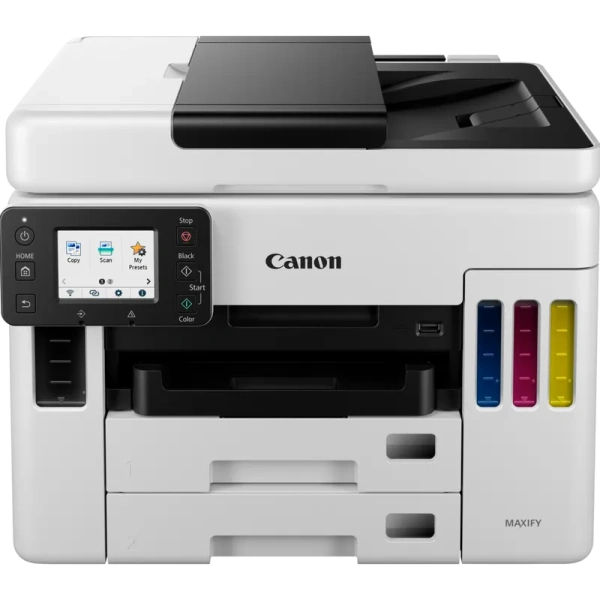
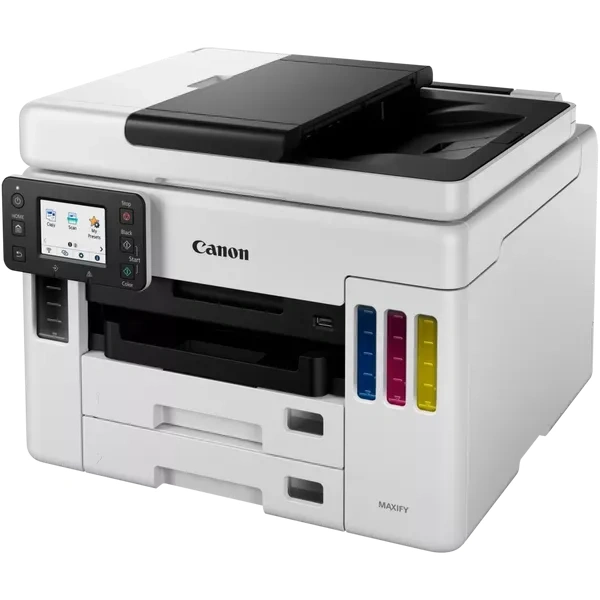
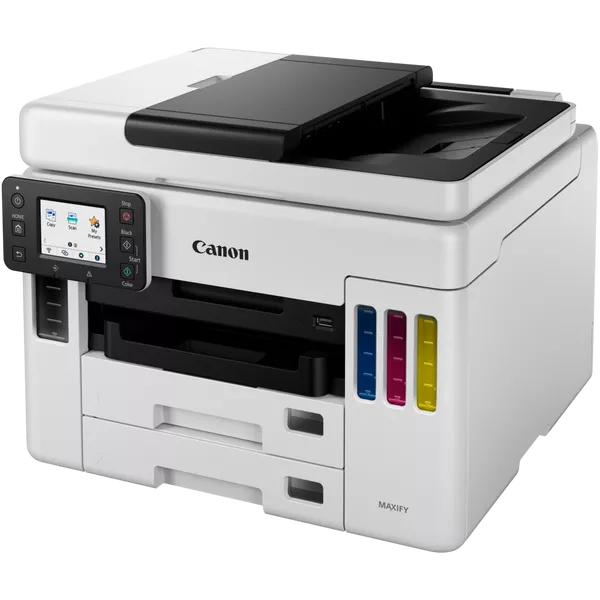
Canon MAXIFY GX7040 4in1 Printer AMP (4471C029AA)
SKU: 4471C029AA

Product Price:

R12699,00

Availability: Out of stock

SKU: 4471C029AA Categories: , , Tags: , , ,
Brand:Canon

PSA Payment Methods: Cash Deposit, EFT, Instant EFT and Debit/Credit Card

Your payment information is processed securely via our payment gateway. 

We do not store credit card details nor will we have access to your credit card information.

(It’s always better to pay via EFT or Instant EFT as card payments incur a 6.5% additional fee to your order)

Canon MAXIFY GX7040 4in1 Printer AMP (4471C029AA)

Canon MAXIFY GX7040 4in1 Printer (4471C029AA)

Experience highly productive business printing with MegaTank using high yield, refillable ink tanks. Count on business quality prints and an extremely low total cost of ownership.
SMALL DECISIONS, MAXIMUM IMPACT

Produce business-quality documents quickly with average savings of 90% on the total cost of ownership vs top 10 laser and inkjet printers4 with these ever-dependable, high volume refillable MegaTank printers.

MAXIFY GX – Product Video
A refillable ink tank printer that packs a heavyweight performance.
The Canon MAXIFY GX7040 4in1 Printer will Meet Your Needs
Choose a cost-conscious business printer that’s a perfect fit for your environment.
Estate Agencies

Produce property portfolios quickly for clients, scan and copy key documents easily with the 50-Sheet ADF – without worrying about ink or paper running out. Print business cards on matte or glossy media.
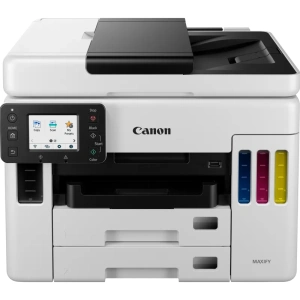
Canon MAXIFY GX7040 4in1 Printer (4471C029AA)

Retail

Print invoices effortlessly thanks to consistent reliability, high speed and a compact footprint. Create high quality, durable point of sale material, promotional banners and tags – all in-house.

Private Clinics

Print client records, new appointment details and even print directly on envelopes. Create persuasive collateral to promote your clinic’s capabilities.

Educational Institutions

Create course materials, presentation handouts as well as administrative documents easily every day with a cost-conscious printer.

Key Benefits of the Canon MAXIFY GX7040 4in1 Printer:

Low Costs That Stay Low

Enjoy huge page yields and low-cost per page on the Canon MAXIFY GX7040 4in1 Printer

Durable Documents – On The Double

High speeds of 24 ipm in black and 15.5 ipm in colour

Compact Yet Highly Capable

Small footprint but a feature-packed performer.

Maximise Efficiency

Energy efficient to reduce cost, time and waste.

Canon MAXIFY GX7040 Megatank business range, 4 in 1, A4 MFP, Print Copy, Scan and Fax with 50 sheet DADF. 24ipm mono, 15.5ipm colour, 600 x 1200 print resolution, 1200 x 1200 dpi scan resolution, 2 x 250 sheet paper handling front cassette, 100 sheet rear feed., Mac, Windows and Chrome; Automatic duplex, 6.9cm LCD touch screen , USB, Wi-Fi, Ethernet. Smartphone and Tablet print, – ink tank (BK, C, M, Y). Uses GI-46 BK/C/M/Y Black 6 000 pages, colour 14 000 pages, uses MC-G01

Exclusive to PackardSA

General Specifications

  • Model Numbers
    MAXIFY GX7040
  • Functions
    Wi-Fi, Ethernet, Print, Copy, Scan, Fax & Cloud

Printer Specifications

  • Print Resolution
    Up to 600 x 1200 dpi
  • Print Margins (min.)
    Top: 3mm, Bottom: 5mm, Left & Right: 3.4mm
  • Print Technology
    1 Print Head
    Refillable ink tank printer
  • Mono Print Speed
    Approx. 24.0 ipm
  • Colour Print Speed
    Approx. 15.5 ipm
  • First-Print-Out Time
    Mono: 7 sec (ready/simplex)
    Colour: 8 sec (ready/simplex)
  • Two Sided Printing
    Auto Duplex Print (A4, Letter – Plain Paper)

Consumables and Yields

  • Standard Ink Bottles
    GI-46 BK
    GI-46 C
    GI-46 M
    GI-46 Y
  • Maintenance Cartridge
    MC-G01 (User Replaceable)
  • Bottle Yield (Plain Paper)
    A4 colour documents printing
    Black: 6,000 pages (Economy mode 9,000 pages)
    Colour: 14,000 pages (Economy mode 21,000 pages)
    * Estimated supplemental yield

Paper Support

  • Paper Types
    Plain Paper,
    Red Label Superior 80 g/m2 (WOP111),
    Canon Oce Office Colour Paper 80 g/m2 (SAT213)
    Photo Paper Pro Luster (LU-101),
    Photo Paper Plus Glossy II (PP-201)
    Matte Photo Paper (MP-101),
    Glossy Photo Paper “Everyday Use” (GP-501)
    High Resolution Paper (HR-101N),
    Envelope,
    Photo Paper Plus Semi-gloss (SG-201),
    Restickable Photo Paper (RP-101)
    Magnetic Photo Paper (MG-101)
    Light Fabric Iron on Transfers (LF-101),
    Double sided Matte Paper (MP-101D)
  • Maximum Paper Input
    Rear Tray: Max. 100 sheets (plain paper)
    Cassette 1: Max. 250 sheets (plain paper)
    Cassette 2: Max. 250 sheets (plain paper)
    ADF: A4, A5, LTR: 50 Sheets, LGL: 10 Sheets
  • Paper Sizes
    Rear Tray: A4, A5, A6, B5, LTR, LGL, 4″x6″ (10 x 15 cm), 5″x7″ (13 x 18 cm), 7″x10″ (18 x 25 cm), 8″x10″ (20 x 25 cm), Square 5″x 5″, (127mm x 127mm), Envelopes (DL, COM10), Custom size (width: 89 mm – 216 mm, length: 127 mm – 1,200 mm)
    Cassette 1: A5, B5, A4, LTR
    Cassette 2: A4, LTRADF: A4, A5, LTR, LGL
  • Paper Weight
    Rear Tray: Plain Paper: 64 g/m2 – 105 g/m2 or supported genuine Canon papers
    Canon paper: Max. paper weight Approx. 275 g/m2
    (Photo Paper Plus Glossy II (PP-201))Cassette 1: Plain Paper: 64 g/m2 – 105 g/m2
    Cassette 2: Plain Paper: 64 g/m2 – 105 g/m2

Scanner Specifications

  • Scanner Type
    Flatbed (D-ADF / Platen) CIS colour scanner
  • Scan Speed
    Duplex. 23.2 ipm Colour
    Duplex. 22 6 ipm Black
    Simplex. 22.1 ipm Colour
    Simplex. 22 1 ipm Black
  • Scanner Resolution (Optical)
    1,200 x 1,200 dpi
  • Line Scanning Speed
    Colour: 1.4 ms/line (300 dpi)
    Greyscale: 1.4 ms/line (300 dpi)
  • Scanning Depth (Input / Output)
    Colour: RGB each 16 bit / 8 bit
    Greyscale: 16 bit / 8 bit
  • Maximum Document Size
    Platen: A4/Letter (216 x 297 mm)
    ADF: A4/Letter/Legal (216 x 356 mm)

Copier Specifications

  • Copy Speed
    sFCOT (colour): Approx. 12 sec
    sESAT (colour): Approx. 12.7 ipm
    ESAT/Simplex ADF (colour): Approx. 12.2 ipm
    ESAT/Simplex ADF (black): Approx. 22.2 ipm
  • Copy Quality
    3 levels (Economy, Standard, High)
  • Intensity Adjustment
    9 levels (automatic adjustment available, AE copy)
  • Multiple Copy
    99 copies (max.)
  • Copy Functions
    Document Copying, Two-Sided Copy, 2-on-1 and 4-on-1 copy, Collated Copy (ADF only), Frame erase copy (Flatbed only), ID copy
  • Copy Zoom
    25 – 400%
    Fit to page
    A5 to A4, B5 to A4, A4 to A5 and A4 to B5

Fax Specifications

  • Fax Type
    Super G3 / Colour
  • Fax Resolution
    Mono: 8pels/mm x 3.85 lines/mm (Standard)
    8pels/mm x 7.7 lines/mm (Fine)
    300 dpi x 300 dpi (Extra Fine)Colour: 200 x 200 dpi
  • Fax Speed
    Mono: Approx. 3 sec.
    Colour: Approx. 1 min.
  • Fax Memory
    Approx. 250 pages
  • Automatic Dialing
    Coded Speed Dialing: Max. 100 locations
    Group Dialing: Max. 99 locations
  • Coded Speed Dialing
    maximum 33.6 kbps (Automatic fall back)

Interface

  • Display Type & Size
    2.7″ / 6.9cm LCD (Touch Screen, Color)
  • Display Languages
    33 Languages Selectable: Japanese, English (mm & inch), German, French, Italian, Spanish, Portuguese, Dutch, Danish, Norwegian, Swedish, Finnish, Russian, Ukrainian, Polish, Czech, Slovenian, Hungarian, Slovakian, Croatian, Romanian, Bulgarian, Turkey, Greek, Estonian, Latvian, Lithuanian, Simplified Chinese, Korean, Traditional Chinese, Thai, Indonesia, Vietnamese

Connectivity

  • Standard Interface
    Hi-Speed USB (B Port)
    Ethernet: 10/100Mbps (auto switchable)
    Wi-Fi: IEEE802.11 b/g/n/a
    Wi-Fi Security: WPA-PSK, WPA2-PSK, WEP, Administration password
    Wireless LAN Frequency Band: 2.4GHz, 5GHz
  • Mobile Apps
    Canon PRINT Inkjet/SELPHY app
    Easy-PhotoPrint Editor app
  • Printer Features
    Easy-PhotoPrint Editor Software
    PIXMA Cloud Link (print)
    Canon Print Service Plugin (Android)
    Apple AirPrint
    Wireless Direct
    Mopria (Android)
  • Smart Assistant & Automation Support
    Amazon Alexa™
    Google Assistant™

Software

  • Supported Operating Systems
    Windows 10, Windows 8.1, Windows 7 SP1
    Operation can only be guaranteed on a PC with pre-installed Windows 7 or later.
    Driver and IJ Printer Assistant Tool only: Windows Server 2008 R2 SP1, Windows Server 2012 R2, Windows Server 2016, Windows Server 2019
    Display environment: XGA 1024 x 768 or more
    Mac: OS X 10.12.6 ~ macOS 10.15, macOS 11>
    Chrome OS
    Mobile Operating Systems: iOS®, iPadOS, Android™
  • Minimum System Requirements
    Windows: 1.5GB or more
    Note: for bundled software installation. The necessary amount of hard disk space required.
  • Software Included
    Printer Driver
    IJ Printer Assistant Tool
    Easy-PhotoPrint Editor (download)

Physical Features

  • Weight
    Approx. 13 kg
  • Dimensions (W x D x H)
    Approx. 399 x 410 x 314 mm (With the trays retracted)
    Approx. 399 x 645 x 387 mm (With the trays extended)
  • Acoustic Noise Levels
    Approx. 49.0dB (A)
  • Recommended Operating Environment
    5-35°C 10-90%RH (no dew condensation)
  • Power Source
    AC 100-240V, 50/60Hz
  • Duty Cycle
    Up to 45,000 pages
  • Power Consumption
    Off: Approx. 0.2W
    Standby (USB connection to PC): Approx. 0.9W
    Standby (all ports connected): Approx. 1.5W
    Time to enter Standby mode: 5minutes
    Copying: Approx. 23W*The wait time for standby cannot be changed (Lot26)
  • Typical Electricity Consumption
    0.15 kWh

Exclusive to PackardSA

Standard Delivery Times for all Products:

Main City Centre’s: 1-3 working days
Regional areas: 3-4 working days
Outlining areas: 3-5 working days

All Back orders ( items which are not in stock ) will take 4 to 10 weeks to order after payment is received.

All Orders under R500.00 will be charged a standard delivery fee.

Once Ordered: If the product has gone end of life (EOL) – you will be notified via email that the product that you have purchased is discontinued and we will or offer you a replacement unit as stipulated by by the manufacture at a new cost or we can refund you.

(Please go through the Returns and Refunds Policy at the bottom of the page for more details)

If ordering accessories or consumables, please make sure they are the correct items for your device or printer and if wrongly ordered please contact us at sales@packardsa.co.za within 24 hours of receiving the product so we can assist you with the process of changing your order.

Weight16,71 kg
Dimensions54 × 47 × 40 cm

Brand

Canon

Shopping Basket
Scroll to Top

Cookies Policy

We use cookies on our website to give you the most relevant experience by remembering your preferences and repeat visits.