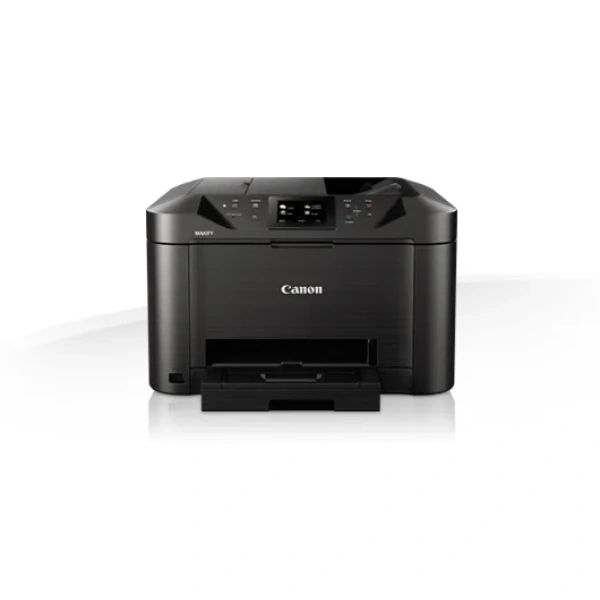
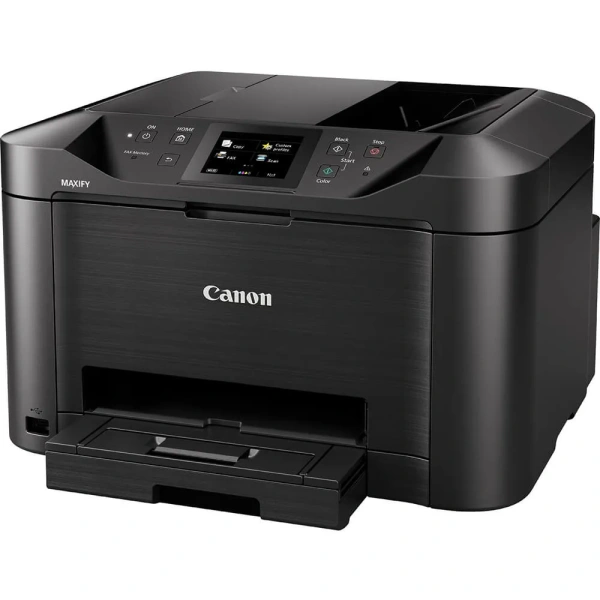
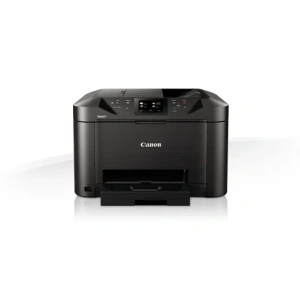
Canon MAXIFY MB5140 A4 4-in-1 Colour Inkjet Printer (0960C040AA)
Built for productivity, performance and reliability.
MAXIFY MB5140 printer
A heavy-duty multifunction colour inkjet printer, scanner, copier and fax, with support for mobile devices and cloud services, fast 24 ipm mono print speed and easy network integration.

Benefits of the Canon MAXIFY MB5140 Printer
- Fast productivity at 24 ipm mono, 15.5 ipm colour
- Wireless printing for smartphones and tablets
- Cloud connectivity: scan to cloud or email
- High ink yields: 2,500 mono/1,500 colour pages
- Large 250-sheet capacity and 50-sheet D-ADF
Detailed Features
Small office, huge productivity
A fully featured printer, scanner, copier and fax designed for smaller offices that still need great mono and colour print quality while being economical to run. Marker- and friction-resistant DRHD Pigment inks produce strong blacks, deep colours and crisp text. The Canon MAXIFY MB5140 prints A4 at an ultra-fast 24 ipm in mono and 15.5 ipm in colour, plus a first page out time (FPOT) is just 6 seconds, while single pass two-sided scanning means you can scan faster than ever.
Superb print economy
From its low energy consumption of just 0.2kWh (TEC) to the individually replaceable colour cartridges, economy is a priority. Black cartridges provide an ISO yield of 2,500 pages and colour cartridges 1,500 pages, letting your office work with fewer interruptions. The optional 4-colour multipack offers even more cost-effective printing.
Increased productivity and ease of use
Printing, copying, scanning or faxing is simple, with the Canon MAXIFY MB5140’s large 8.8 cm (3.5”) TFT colour touchscreen and improved user interface. In addition to its high-capacity 250-sheet feeder and 50-sheet automatic document feeder, the printer’s double-sided printing and support for a variety of paper sizes and types – from A4 plain paper, to labels, envelopes, photo paper and even two-sided ID card copying – make light work of common office print jobs.

Mobile-ready, cloud-ready, work-ready
Support for Apple AirPrint (iOS), Mopria and the Canon PRINT app provide quick and simple printing and scanning from mobile devices. You can print from the cloud and even scan and save documents to popular cloud services, including Google Drive, Dropbox, Evernote, OneNote, OneDrive and Concur. Access Point mode means mobile device users can connect to the printer without a Wi-Fi network.
Comprehensive monitoring and maintenance capabilities
IP address filtering means only a select number of users can be given access, while SMTP email support allows secure scan-to-email. System administrators can quickly and easily configure the printer and restrict certain operations, such as scan-to-USB.
Effortless network integration
Simple Network Management Protocol (SNMP) compatibility makes it easy to integrate the printer into an existing office network. The SNMP standard enables a range of maintenance monitoring functions, including ink levels, error status, and page count.
Canon MB5140 Inkjet maxify business range A4, A4 MFP, Print, Copy, Fax and Scan. 24ipm mono, 15ipm colour, 600 x 1200 print resolution, 1200 x 2400 dpi scan resolution, 250 sheet paper handling, 50 Sheet DADF, Automatic duplex, touch screen , USB, Wi-Fi, Ethernet. , Smartphone and Tablet print, Scan to cloud, Scan to USB, Quick first print of 6 seconds. – 4 ink system, ,(BK, C, M, Y). Uses PGI- 2400 BK, C, M and Y XL cartrdiges SNMP AND SMTP SUPPORT
Exclusive to PackardSA
General Specifications
Functions
Print, Copy, Scan, Fax, Wi-Fi, Ethernet + Cloud Link
Printer Specifications
Print Resolution
600 x 1200 dpi
Print Margins (min.)
Top: 3mm, Bottom: 5mm, Left & Right: 3.4mm
Print Technology
Inkjet, FINE print head
Mono Print Speed
24.0 ipm mono A4
Colour Print Speed
15.5 ipm colour A4
First-Print-Out Time
Mono: 6 sec (ready) / 10 sec (sleep)
Colour: 7 sec (ready) / 12 sec (sleep)
Two-Sided Printing
Automatic (A4, LTR plain paper)
Automatic Document Feeder (ADF)
Up to 50-sheets
Cartridges and Yields
Standard Ink Cartridges
Dual Resistant High-Density ink
4 ink tanks (Black, Cyan, Magenta, Yellow)
Optional XL Ink Cartridges
PGI-2400XL BK (2500 pages)
PGI-2400XL C (1755 pages)
PGI-2400XL M (1295 pages)
PGI-2400XL Y (1520 pages)
Colour ink tanks (CMY) average yield: 1500 pages
Paper Support
Paper Types
Plain Paper
Envelopes (DL, COM10, C5, Monarch)
Canon High Resolution Paper (HR-101N)
Canon Matte (MP-101)
Canon Pro Luster (LU-101)
Canon Plus Semi-gloss (SG-201)
Canon Plus Glossy II (PP-201)
Canon Glossy Everyday Use (GP-501)
Maximum Paper Input
Cassette: 250 sheets of plain paper
Paper Sizes
Plain paper: A4, A5, B5, LTR, LGL
Photo paper: A4, LTR, 20x25cm, 13x18cm, 10x15cm
Custom sizes: Width 89-215.9 mm, Length 127-355.6 mm
Paper Weight
Plain paper: 64 – 105 g/m²
Canon photo paper up to 275 g/m²
Scanner Specifications
Scanner Type
Flatbed, ADF
2x CIS colour scanner
Available (single pass)
Scan Speed
Duplex. 23 ipm Col
Duplex. 23 ipm B/W
Scanner Resolution (Optical)
Up to 1200 x 1200 dpi
Scanning Depth (Input / Output)
Colour: 48 bit / 24 bit
Greyscale: 16 bit / 8 bit
Maximum Document Size
Flatbed: A4, LTR (216x297mm)
ADF: A4, LTR, LGL
Copier Specifications
Copy Speed
ADF colour: 11.5 ipm
ADF mono: 22.0 ipm
Copy Quality
Standard, High
Multiple Copy
Up to 99 pages
Copy Functions
Frame Erase, Collate, 2-on-1, 4-on-1
Copy Zoom
25-400%, Fit to Page
Fax Specifications
Fax Type
Super G3 / Colour
Fax Resolution
Mono: up to 300 x 300dpi
Colour: 200 x 200 dpi
Fax Speed
Mono: approx. 3 sec. (33.6kbps)
Colour: approx. 1 min. (33.6kbps)
Fax Memory
Up to 250 pages
Coded Speed Dialing
Max. 100 locations
Group Dial
Max. 99 locations
Interface
Display Type & Size
8.8cm colour touch screen
Connectivity
Wired LAN
Hi-Speed USB 2.0
Ethernet 10/100Mbps (auto switchable)
USB flash memory port (A type)
Wireless LAN
Wi-Fi IEEE802.11 b/g/n
Wireless LAN Frequency Band: 2.4GHz
Access Point Mode
Please refer to the user manual for instructions on how to activate/deactivate the wireless LAN.
Print Applications & Methods
Canon PRINT Inkjet/SELPHY app
MAXIFY Cloud Link (from printer screen or smart device)
Canon Print Service plug-in (Android)
Mopria
Microsoft Mobile Print
Apple AirPrint
Software
Supported Operating Systems
Chrome OS
Windows 10 / 8.1 / 8 / 7 / 7 SP1 / Vista SP2
Windows Server 2008 / 2008 R2 / 2012 / 2012 R2
Mac OS X v10.8.5 or later
Supported Mobile Systems
iOS, Android, Windows RT, Windows 10 Mobile
Minimum System Requirements
Windows: Internet Explorer 8, internet connection or CD-ROM
Mac: Safari 5 and internet connection
Display: 1024×768 or higher
Software Included
Printer driver and fax driver
Quick Utility Toolbox
IJ Network Device Setup Utility
Easy-WebPrint EX
Physical Features
Weight
11.4kg
Dimensions (W x D x H)
463 x 394 x 291 mm
463 x 459 x 291 mm (paper installed)
Acoustic Noise Levels
Approx. 56 dB(A)
Recommended Operating Environment
Temperature: 15-30°C
Humidity: 10-80%RH (no dew condensation)
Power Source
AC 100-240V, 50/60Hz
Duty Cycle
up to 30,000 pages
Power Consumption
Standby (scanning lamp is off)
USB connection to PC : approx. 0.9 W
Standby (all ports connected, scanning lamp is off) : approx. 1.7 W
Time to enter Standby mode : approx. 7 mins
OFF : approx. 0.2 W
Copying (USB connection to PC): approx. 25 W
Typical Electricity Consumption
0.16 kWh
Recommended Print Volume
250-1500 pages / month
Exclusive to PackardSA
Standard Delivery Times for all Products:
Main City Centre’s: 1-3 working days
Regional areas: 3-4 working days
Outlining areas: 3-5 working days
All Back orders ( items which are not in stock ) will take 4 to 10 weeks to order after payment is received.
All Orders under R500.00 will be charged a standard delivery fee.
Once Ordered: If the product has gone end of life (EOL) – you will be notified via email that the product that you have purchased is discontinued and we will or offer you a replacement unit as stipulated by by the manufacture at a new cost or we can refund you.
(Please go through the Returns and Refunds Policy at the bottom of the page for more details)
If ordering accessories or consumables, please make sure they are the correct items for your device or printer and if wrongly ordered please contact us at sales@packardsa.co.za within 24 hours of receiving the product so we can assist you with the process of changing your order.